A customer service manager at a telecom company came to me with no coding background and one big reason: curiosity. They wanted to understand the world of AI agents, and the best way to do that was to build one.
A few weeks later, they had an agent that can look up a customer’s bill, answer questions from a knowledge base, ask a human for approval before doing anything risky, and email a summary report when the chat ends.
On top of that, the manager added voice support all by themselves.
Why an AI agent for customer service?
Missed calls cost money. One 2026 benchmark from Invoca, which tracked about 70 million calls, found that around 44% were missed. These numbers come from call-tracking vendors, so treat them as rough. Still, a missed call is often a lost customer.
Questions about bills, plans and basic troubleshooting come up again and again, and they follow clear rules, which suits an agent well. Big companies are heading the same way. Gartner predicts that by 2029, agentic AI will solve 80% of common customer service issues without a human, and cut operating costs by 30%. (Gartner press release, March 2025)
The workshop: a telecom customer service agent
To keep things safe and realistic, we made up a carrier called Blazz, and named the agent Blake. We used three of the most common situations in telecom support:
- Billing questions and plan changes: “Why is my bill higher this month?”
- Troubleshooting: “My internet is down. What can I do?”
- Cancellation and retention: “I want to cancel my plan.”
The tools we used
| Tool | What it does in the project |
|---|---|
| n8n (self-hosted on Google Cloud) | The “brain” workflow. It connects everything together. |
| An LLM (Gemini) | Reads the customer’s message and decides what to do next. |
| Supabase | Stores customer data like bills and plans, and holds the knowledge base. |
| Gemini embeddings | Turns help articles into searchable form, so the agent can find the right one (this is called RAG). |
| Lets a human approve risky actions and receive reports. | |
| MCP + Claude Code | Lets us build n8n workflows by describing them in plain language. Claude Code also helped plan the practice data. |
| Voiceflow | Added by the manager to make a voice version of the agent. |
How the agent works
When a customer sends a message, Blake follows these steps:
- Verify who the customer is.
- Look up the facts. Blake checks bills and plans in the database, and searches the knowledge base for help articles.
- Check the risk. If the customer wants something that changes their account, like cancelling or switching plans, Blake does not decide alone. It emails a human and waits for an Approve or Decline answer.
- Reply to the customer, using only what was actually approved.
- Send a summary when the chat ends. The summary goes to the team, not the customer.
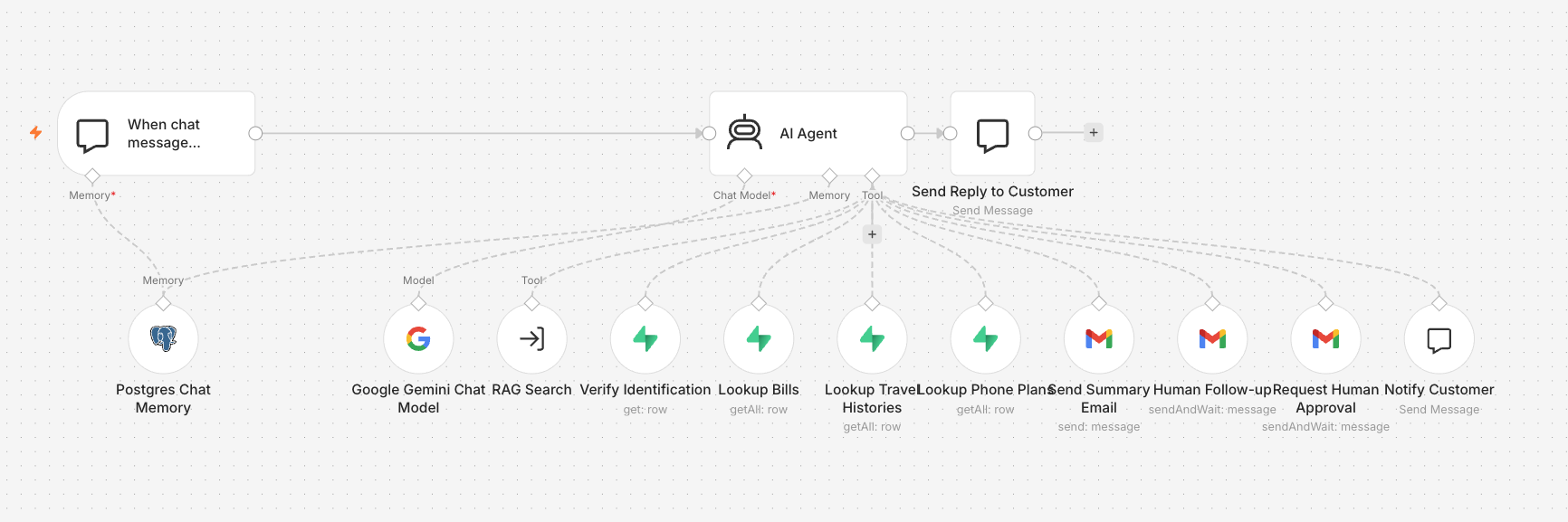 Blake in n8n: a chat trigger, one AI agent, and the tools it can reach for, from database lookups to the approval email.
See Blake in action
Here is one full conversation, recorded on a phone-sized screen. I played the customer, Sarah Chen, using test data. The video is sped up, because Blake sometimes takes a few seconds to answer.
A full chat with Blake: bill lookup, a fee waiver that needs a human, two knowledge base answers, and a polite refusal.
Here is what happens in the recording:
- Blake asks for a name and PIN. I type a wrong PIN first, and Blake does not let me in. It does not say which part was wrong.
- I give the right PIN. Blake pulls up the September bill: $2,005, made up of a $55 plan fee and $1,950 in roaming charges. It ties the roaming charges to a trip to Japan and South Korea in August.
- I ask which plan would have avoided this. Blake compares my current plan with the Global Roamer plan.
- I ask Blake to waive the roaming fee. Blake does not promise anything. It tells me it is checking with a colleague, and a human gets an approval email (the video cuts to it).
- The human clicks Approve, and only then does Blake tell me the fee is waived as a one-time courtesy.
- I switch topics and ask about a flashing router light, then about the early cancellation fee. Blake answers both from the knowledge base.
- I ask for restaurant tips in Kyoto. Blake politely says it can only help with Blazz.
- I say goodbye, and Blake closes the chat. The video ends on the summary email that arrives afterwards.
This is the approval email, as the human sees it:
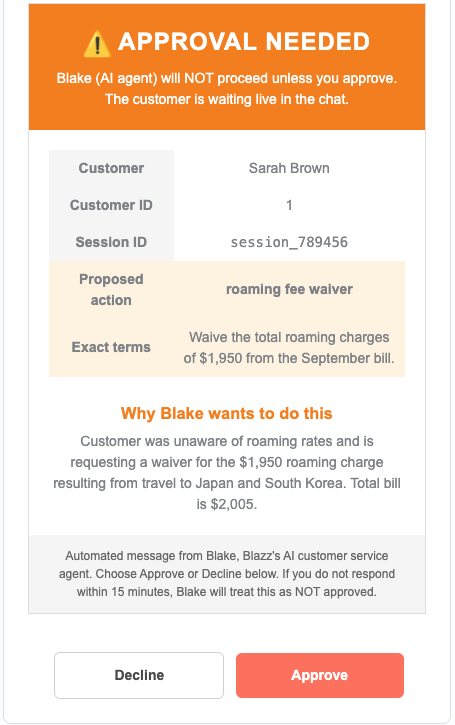 The person only has to read the exact terms and click one button.
Three ideas that made it click
1. Humans approve the risky stuff
Blake can answer a billing question on its own. But if a customer asks to cancel, or asks for a discount, Blake pauses and asks a human first. If the human says no, or does not answer, it counts as “not approved.”
The manager decides where the agent can act alone, and where a person has to sign off.
2. Every chat ends with a report and a confidence score
When a conversation ends, the agent emails a summary. It includes what the customer wanted, what the agent did, and a confidence score. A real person can then review the low-confidence chats first, instead of reading everything.
This is the summary email that arrived after the chat above:
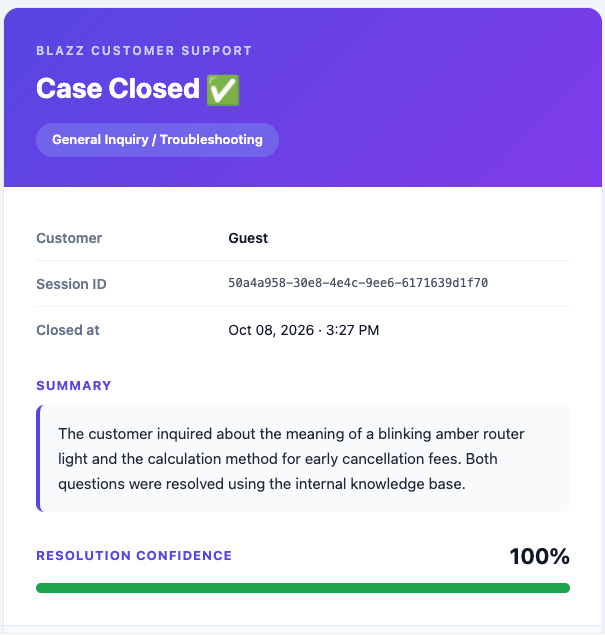 The summary email the team receives when a chat ends.
3. A database and a knowledge base do different jobs
- The database answers questions about one specific customer: “What was this customer’s bill last month?”
- The knowledge base answers general questions: “How do I fix a blinking router light?”
The knowledge base uses RAG, which means: find the most relevant articles first, then answer from them. I explained it like looking something up in a handbook before answering a customer, instead of answering from memory.
Teaching someone with no coding background
We started with the SOP rather than the software. A customer service manager already knows the steps for handling a bill complaint, and the tools turn those steps into a workflow. Claude Code planned the fake customer data, so the manager could spend their time on how the agent thinks.
With MCP, we could describe a workflow in plain words and let Claude Code build it in n8n. Then the manager read the workflow and changed it, which was much easier than starting from a blank canvas.
We also set up a separate n8n server on Google Cloud, after starting on n8n’s cloud service, so the manager keeps a working agent after the course ends.
One thing was harder than I expected: dragging n8n nodes by hand and filling in their settings, especially for the RAG knowledge base. There are many small boxes, each with its own options, and it is easy to get lost. I still think going through it by hand was worth it, because it showed what each piece does. But in the end, we connected the n8n MCP server, and the same setup only needed a prompt.
The moments I enjoyed most were the small ones. The first time Blake replied, the manager gasped. It happened again each time something new started running on their own computer. They had never written code, and you could see how proud they were.
The manager went further than the course
Voice support was the manager’s own addition. With no help from me, they used Claude Code together with the Voiceflow MCP server to build a voice version of the agent.
The manager also wrote about the experience: read their story on LinkedIn.
Where to start
The tools will keep changing. What stayed the same was the manager’s knowledge of how a good customer conversation goes, and that is what Blake runs on.
If you lead a team, try this: write down one process your people repeat every day, step by step. Mark which steps are safe for an agent to do alone, and which need a person to sign off. That list is where an agent project starts.
Sources: Gartner press release (linked above); Invoca 2026 benchmark as reported by JustCall.