
Ever wanted to know the actual health of your vibe-coded project? Which part of it quietly falls short?
That turns out to be genuinely hard to tell just by looking. A vibe-coded project rarely fails loudly — there’s no error message for “your documentation is lying.”
After comparing a handful of vibe-coded projects against professional engineering conventions, I built a prompt that turns the gap into a quick, repeatable metric.
The CRAFTS Health Check Model
Each axis is scored 0 to 10. One column says what earns the score; the other says what it costs you if the score is low. I deliberately asked the AI to speak in language a non-technical reader can act on, so you understand the business impact of each metric — not just its technical name.
| Axis | What gets a higher score | What a low score costs you |
|---|---|---|
| C — Clarity | Requirements, specified boundaries, and retired specs are written down — and still match what the code does | The AI keeps building against a stale spec, and you pay for work nobody wants anymore |
| R — Regression safety | Tests exist, “done” is defined, and a failure says clearly what broke | New features quietly break what used to work |
| A — Approachability | Setup runs as documented, the layout is self-explanatory, and no file is too big to read in one sitting | Every new AI session burns time getting oriented instead of shipping |
| F — Technical fit | Every major technology choice matches what the product actually needs, with the reasoning written down | The product resists scaling cleanly, and every workaround adds more debt |
| T — Tidiness | Well-structured folders, logic isn’t duplicated, conventions stay consistent, and no dead code lingers | Every small change costs more time — and more budget — than it should |
| S — Security | Keys and tokens are handled safely, and every request checks that the caller owns the data it’s touching | Leaked keys, or users reading data that isn’t theirs |
Security is only scored when a project actually has something to secure — a backend, accounts, or user data. A static site or an offline tool has nothing there to score, so the axis is dropped rather than marked zero.
The Prompt in Full
Copy the prompt below and paste it in as-is — it’s written to be handed to an agent verbatim.
# Vibe Code Health Check — the CRAFTS model

Run a health check on the current project. Produce a radar chart across the CRAFTS axes and the ten highest-leverage improvements.

**C** — Clarity · **R** — Regression safety · **A** — Approachability · **F** — Technical fit · **T** — Tidiness · **S** — Security (conditional)

Your reader cares about **business impact**. They want to know what this codebase will cost them — in time, in rework, in risk. They are technically literate but not deep in this stack, so avoid dense jargon: say "renaming one field means editing seven files" rather than "high coupling"; say "the AI can't see your architecture decisions, so it re-derives them every session" rather than "no ADRs." When a technical term is genuinely the clearest word, define it inline with a comma.

Write the report in the same language the user is writing in.

---

## 1. Scoring discipline

Break any of these three and the report is worthless.

**Default to skepticism.** Most real projects land at 4-6 on most axes. Anything above 8 needs explicit evidence; 9-10 is rare. Do not reward a project for looking tidy — tidy and "an AI agent can take this over" are different properties.

**Evidence is mandatory.** Every deduction must point at something concrete, one of:
- `path/to/file.ts:142` — something you actually read
- "No X found" — something you actually searched for and did not find (state what you searched)

Observations you cannot cite are not scored and do not appear in the report. Never prop up a score with "seems to," "probably lacks," or "generally."

**Read before you score.** Before scoring anything, at minimum: list the full directory tree; read the README and every `*.md`; read the package manifest and lockfile; read the entry point; sample three to five core logic files; check `.env*`, `.gitignore`, CI config, and the test directory. You may not score what you have not read.

**Verify the premise of any finding before it becomes a recommendation.** A field being declared is not the same as it being honoured; a flag set on one file is not the same as it being set on one file only. Where a proposed fix would change what the project produces, run the build and compare the output before and after. A recommendation built on an unchecked assumption is worse than no recommendation.

---

## 2. Scoring

Every axis gets a single 0-10 score, plus one **overall score**: the plain average of the axis scores, to one decimal place. Report the overall figure first — it is what the reader remembers — then the axes that explain it.

An axis score answers one question: **is this thing done well, and is it written down where someone new can find it?** Those are deliberately fused. Work that exists only in the author's head cannot be acted on by a new collaborator or by an AI agent, so it does not earn full marks no matter how good the thinking
behind it was.

**Anchors:**
- 0-2: absent, or present but actively harmful (misleading, dead, contradicted by the code)
- 3-4: a sketch exists, but it does not hold up in practice
- 5-6: workable; nothing breaks today, but growth will hurt
- 7-8: clear, consistent, deliberately designed, and documented where an agent will find it
- 9-10: enforced rather than described — types, schemas, lint rules, tests make the wrong thing hard to do

## 3. The axes

Score only what this project should have. A CLI tool needs no user-flow docs; a static site needs no database schema. Sub-items that do not apply are excluded from that axis and omitted from the report — **never deduct for something the project has no reason to have.**

### C — Clarity
> Are you paying to build things nobody asked for, or discovering after the fact that it has to be redone?

Look at: whether current requirements are written down; whether **what is explicitly out of scope** is written down (this matters more than the requirements themselves — it is what stops an agent from growing features sideways); whether data structures and user flows are described; whether retired specs are marked `DEPRECATED` or deleted outright.

Note especially: where documentation contradicts actual code behavior, that is a **negative**, worse than having no documentation at all — an agent will follow the wrong spec confidently.

### R — Regression safety
> What are the odds each release quietly breaks something that used to work — and how long until anyone notices?

Two layers:
**Mechanism** — is "done" defined anywhere; do tests exist and what paths do they cover; are type checking, linting, and CI wired up; is there a command an agent can run to verify its own work (`npm test`, `npm run build`).
**Signal** — is what the mechanism reports good enough for an agent to self-correct. Are errors swallowed by empty catch blocks; is logging structured; does a failing test say where the problem is.

A project with tests but swallowed errors caps at 4 on this axis — without usable feedback, an agent cannot iterate toward a fix.

### A — Approachability
> Can a new person, or an AI agent, make a correct change on day one — or do they lose three days to setup and hunting for files?

Look at: whether directory names reveal purpose at a glance (spec / src / db / test / static / job); whether the README setup steps actually run; presence of `.env.example`, a lockfile, seed data, a single start command; any file over ~800 lines that an agent cannot hold in context at once; whether filenames locate functionality.

Low: a 2,000-line `utils.ts`, a README that says only "npm install," three environment variables you discover only at runtime.
High: clone, run three documented commands, it works — and one look at the tree tells you where a new feature belongs.

### F — Technical fit
> Are the tools a match for what this product actually needs to do — or is the stack fighting the requirement?

This axis is about **fit between requirement and technology**, not about how neatly the code is written. A perfectly clean codebase built on the wrong foundation scores low here and high on Tidiness.

Ask what this product actually needs — content discovery, real-time updates, scheduled work, offline use, heavy write concurrency, strict data integrity, low mobile bandwidth — and whether each chosen technology serves it. Common mismatches:
- A content or marketing site built as a client-rendered SPA when discoverability and first-paint speed are the whole point
- Scheduled or long-running work on a platform that sleeps idle containers or has no cron primitive
- A file-backed database where concurrent writers are expected
- Serverless functions for jobs that exceed the execution timeout
- Polling loops where the product promises real-time
- Infrastructure sized for scale the product will not see for years, paid for in setup complexity today

Score both directions: over-engineering is as much a mismatch as under-engineering. Note where a mismatch is already costing something visible (workarounds in the code, a caching layer papering over a rendering choice) versus where it is merely latent.

Whether the reasoning behind each significant choice is written down counts directly toward this axis. An agent that cannot see why a stack was chosen will either fight it or accidentally undo it, so an undocumented good decision does not score above 6 here.

### T — Tidiness
> The same small request takes an hour this week and a full day six months from now.

Four distinct ailments:
**Repetition** — the same logic copy-pasted in several places.
**Divergence** — the same job done several different ways: three fetch patterns, two error-handling styles, inconsistent naming. This is the signature ailment of AI-generated code, where separate sessions each grew their own convention.
**Residue** — unreferenced files, commented-out old implementations, `*-old.*` / `*-copy.*` / `*-v2.*`, abandoned experiments. These actively corrupt an agent's judgment — it reads the stale file and copies the stale pattern. Before calling something residue, confirm nothing references it; a scratch directory that a documented workflow writes into is a working area, not debris.
**Entanglement** — whether module boundaries are real or everything can reach everything; whether data flows in one direction; whether a single small change forces edits across five or more unrelated files.

### S — Security (conditional)
> Risk of leaked credentials or users reading data that is not theirs.

**Score and display this axis only if the project meets at least one of:** it has a backend, API routes, or server actions; it has user authentication or sessions; it has a database or persists user data; it calls third-party services requiring keys; it handles payments or personal data.

For a purely static frontend, a display-only site, or a tool with no authentication — **omit the S axis entirely.** Draw a five-axis CRAFT instead of a six-axis CRAFTS, and open the report with one line: "This project has no backend and stores no user data, so the security axis does not apply." Do not score it 0; a zero reads as a problem.

Where it does apply, look at: whether keys are in version control (check both the working tree and `git log -p` history); whether `.env` is in `.gitignore`; whether the frontend exposes keys that belong server-side; where tokens live and how long they last; and **authorization checks** — does each API verify that the caller may access the data it is returning. That last one is the most common real vulnerability in projects like these, more so than key management.

Personal data published by accident belongs here too: screenshots, fixtures, or seed data containing real names, addresses, transaction records, or account identifiers on a public site.

---

## 4. Do not double-count

Adjacent axes invite the same observation being scored twice, which distorts the chart shape. Route each finding to exactly one axis:

| What you found | Scores under | Not under |
|---|---|---|
| A 2,000-line file | A — too big to take in | T |
| One change forces edits in seven files | T — entanglement | F |
| The stack is wrong for the requirement | F | T, even if it also makes the code messy |
| No recorded reason for a technology choice | F | C |
| No tests, or unusable failure output | R | T |
| Docs describe behavior the code does not have | C, as a negative | A |
| Dead files and commented-out code | T — residue | A |
| Setup steps that do not actually run | A | R |
| A committed `.env`, or real personal data in published assets | S; if S does not apply, report it as a standalone flag outside the chart | — |

---

## 5. Output format

### Part one: the chart

Draw a radar chart (star diagram): six axes for CRAFTS, five for CRAFT when security does not apply; one dataset; scale 0-10. Order the axes C-R-A-F-T-S clockwise from the top so the shape and the mnemonic line up. **Label every axis with its own score** — put it in the axis label itself, e.g. `C Clarity 7/10`, so the number is readable without counting gridlines. State the overall average above the chart.

**If you cannot render charts, or charts do not display in this environment, do not attempt ASCII art.** Emit this text table instead and leave the rest of the format unchanged:

```
Overall  6.6 / 10

C   Clarity              7/10
R   Regression safety    4/10
A   Approachability      8/10
F   Technical fit        7/10
T   Tidiness             7/10
S   Security              — not applicable
```

### Part two: the written report

Prose target: **700-1000 words.** The recommendations table does not count toward it — its length is controlled by the per-field caps instead. Per-section budgets, which take priority over the global target:

**Opening** — one or two sentences. The overall score and the whole project in a single diagnosis.

**Each axis** — up to 5 bullet points, each one a distinct, cited fact behind the score, ordered most-representative first. List fewer than 5 when fewer genuine findings exist — do not pad the list to hit the count.

**Top 10 recommendations** — ordered by **return on effort**, not by severity. A security issue at 2/10 that needs a three-week refactor ranks below a documentation gap at 3/10 that takes thirty minutes. List fewer than 10 when fewer genuine, actionable fixes exist — do not pad the list to hit the count. Render as a table, five columns, numbered 1 upward in the order given:

| Column | Requirement |
|---|---|
| # | Rank, 1 upward. The order itself is the ranking — number 1 is the best return, not necessarily the worst score. |
| Action | One imperative sentence, specific down to the file. Max 20 words. |
| Impact | Which axis, and the projected lift — e.g. "R 3 → 6". Max 10 words. |
| Effort | An order of magnitude: 30 minutes / half a day / a week. |
| Why | One **business** reason, not a technical one. Max 20 words. |

If you are running long, cut from the per-axis section before you cut from Top 10. The recommendations are what the reader acts on.

### Tone

This is a diagnostic report. Do not cheerlead and do not scold. State what is true, cite where you saw it, and move on.
Leveraging the Report
Run it, and here’s the shape of what comes back: a fabricated example for a two-person team’s subscription-tracking app, invented purely for illustration.
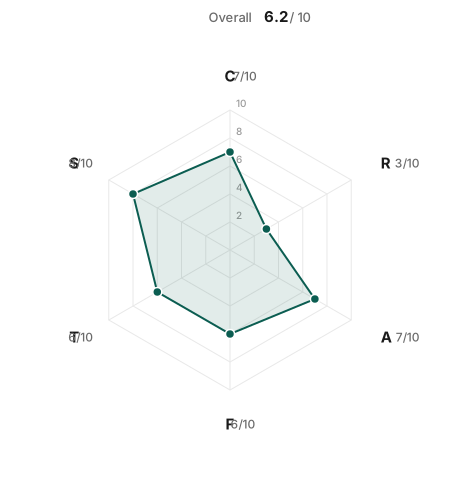
A finished report — like the sample above — gives one overall score, an axis breakdown, and top recommendations. They carry very different weight.
The overall number is a conversation starter, not a grade. Below 4, the AI is actively working against you. 4 to 6 is where most working projects sit — nothing broken today, but growth will hurt. Above 7 means someone wrote their decisions down; above 8 usually means those decisions are enforced by tooling, not just described.
The three recommendations are the real output — ranked by effort, not severity. In the sample above, a serious ownership bug and a minor formatting mess both cost thirty minutes, so both outrank a half-day test fix. On a small project, momentum beats heroics.
Don’t chase tens. A 10 means a rule is enforced by tooling, not prose. For a five-page site, that’s over-engineering. Sitting at 7 across the board is genuinely healthy — there’s nothing to win above it.
How did your project score? Did the top three recommendations feel right, or off?
Run it on something you’re building, fix what it finds, and tell me whether vibe-coding felt any easier afterward.